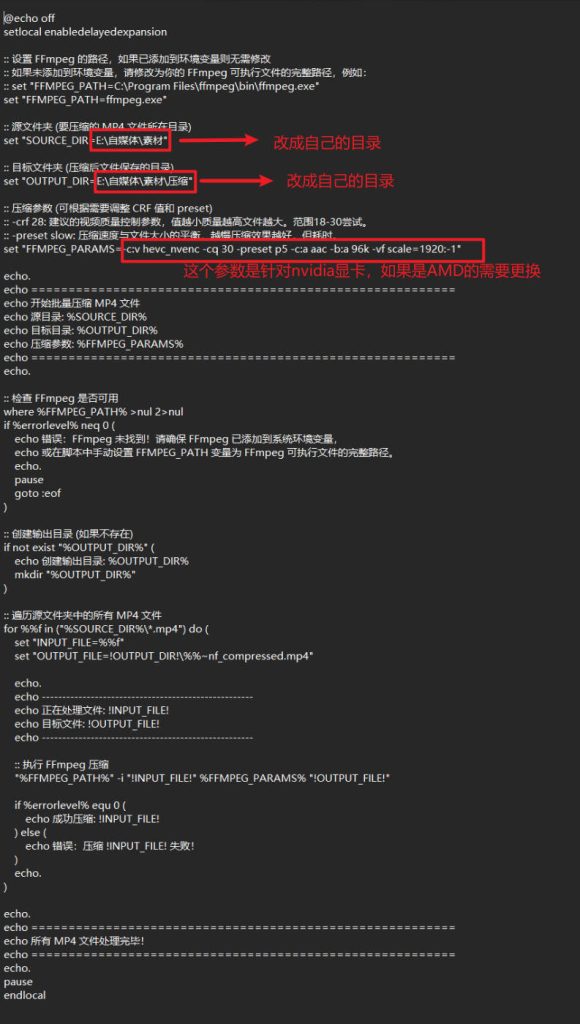
通过GPU压缩视频程序下载

給大家推荐一个通过gpu对视频文件进行压缩处理的程序,压缩后的视频在画质上基本无损。(用肉眼看基本上看不出差别)

下载地址如下:

通过网盘分享的文件:视频压缩程序文件.rar
链接: https://pan.baidu.com/s/1POLZgVYlzL4F2nvxtYd2rg 提取码: kux4

L2TP/IPsec Server auto install script (CentOS 7)

使用方法

1)新建一个名为*.sh的文件(以l2tp-server.sh为例),填入以下脚本代码。
2)导入到CentOS7系统任意目录下,然后执行 sh l2tp-server.sh即可自动配置。

#!/usr/bin/env bash
PATH=/bin:/sbin:/usr/bin:/usr/sbin:/usr/local/bin:/usr/local/sbin:~/bin
export PATH

cur_dir=`pwd`

rootness(){
    if [[ $EUID -ne 0 ]]; then
       echo "Error:This script must be run as root!" 1>&2
       exit 1
    fi
}

tunavailable(){
    if [[ ! -e /dev/net/tun ]]; then
        echo "Error:TUN/TAP is not available!" 1>&2
        exit 1
    fi
}

disable_selinux(){
if [ -s /etc/selinux/config ] && grep 'SELINUX=enforcing' /etc/selinux/config; then
    sed -i 's/SELINUX=enforcing/SELINUX=disabled/g' /etc/selinux/config
    setenforce 0
fi
}

get_opsy(){
    [ -f /etc/redhat-release ] && awk '{print ($1,$3~/^[0-9]/?$3:$4)}' /etc/redhat-release && return
    [ -f /etc/os-release ] && awk -F'[= "]' '/PRETTY_NAME/{print $3,$4,$5}' /etc/os-release && return
    [ -f /etc/lsb-release ] && awk -F'[="]+' '/DESCRIPTION/{print $2}' /etc/lsb-release && return
}

get_os_info(){
    IP=$( ip addr | egrep -o '[0-9]{1,3}\.[0-9]{1,3}\.[0-9]{1,3}\.[0-9]{1,3}' | egrep -v "^192\.168|^172\.1[6-9]\.|^172\.2[0-9]\.|^172\.3[0-2]\.|^10\.|^127\.|^255\.|^0\." | head -n 1 )
    [ -z ${IP} ] && IP=$( wget -qO- -t1 -T2 myip.ipip.net | egrep -o '[0-9]{1,3}\.[0-9]{1,3}\.[0-9]{1,3}\.[0-9]{1,3}')

    local cname=$( awk -F: '/model name/ {name=$2} END {print name}' /proc/cpuinfo | sed 's/^[ \t]*//;s/[ \t]*$//' )
    local cores=$( awk -F: '/model name/ {core++} END {print core}' /proc/cpuinfo )
    local freq=$( awk -F: '/cpu MHz/ {freq=$2} END {print freq}' /proc/cpuinfo | sed 's/^[ \t]*//;s/[ \t]*$//' )
    local tram=$( free -m | awk '/Mem/ {print $2}' )
    local swap=$( free -m | awk '/Swap/ {print $2}' )
    local up=$( awk '{a=$1/86400;b=($1%86400)/3600;c=($1%3600)/60;d=$1%60} {printf("%ddays, %d:%d:%d\n",a,b,c,d)}' /proc/uptime )
    local load=$( w | head -1 | awk -F'load average:' '{print $2}' | sed 's/^[ \t]*//;s/[ \t]*$//' )
    local opsy=$( get_opsy )
    local arch=$( uname -m )
    local lbit=$( getconf LONG_BIT )
    local host=$( hostname )
    local kern=$( uname -r )

    echo "########## System Information ##########"
    echo 
    echo "CPU model            : ${cname}"
    echo "Number of cores      : ${cores}"
    echo "CPU frequency        : ${freq} MHz"
    echo "Total amount of ram  : ${tram} MB"
    echo "Total amount of swap : ${swap} MB"
    echo "System uptime        : ${up}"
    echo "Load average         : ${load}"
    echo "OS                   : ${opsy}"
    echo "Arch                 : ${arch} (${lbit} Bit)"
    echo "Kernel               : ${kern}"
    echo "Hostname             : ${host}"
    echo "IPv4 address         : ${IP}"
    echo 
    echo "########################################"
}


check_sys(){
    local checkType=$1
    local value=$2

    local release=''
    local systemPackage=''

    if [[ -f /etc/redhat-release ]]; then
        release="centos"
        systemPackage="yum"
    elif cat /etc/issue | grep -Eqi "centos|red hat|redhat"; then
        release="centos"
        systemPackage="yum"
    elif cat /proc/version | grep -Eqi "centos|red hat|redhat"; then
        release="centos"
        systemPackage="yum"
    fi

    if [[ ${checkType} == "sysRelease" ]]; then
        if [ "$value" == "$release" ];then
            return 0
        else
            return 1
        fi
    elif [[ ${checkType} == "packageManager" ]]; then
        if [ "$value" == "$systemPackage" ];then
            return 0
        else
            return 1
        fi
    fi
}

versionget(){
    if [[ -s /etc/redhat-release ]];then
        grep -oE  "[0-9.]+" /etc/redhat-release
    else
        grep -oE  "[0-9.]+" /etc/issue
    fi
}

version_check(){
    if check_sys sysRelease centos;then
        local version="`versionget`"
        local main_ver=${version%%.*}        
        if check_sys packageManager yum; then
            if [ "${main_ver}" == "7" ];then
                echo "Current OS version: CentOS ${main_ver} is supported"
                return 0
            else
                echo "Error: CentOS ${main_ver} is not supported, Please re-install OS and try again."
                exit 1
            fi
        fi
    fi
}

preinstall_l2tp(){
    echo
	iprange="192.168.8"
	mypsk="12345678"
	username="test"
	password='test1234'
}

install_l2tp(){

    echo "Adding the EPEL repository..."
    yum -y install epel-release yum-utils
    yum-config-manager --enable epel
    yum -y install ppp libreswan xl2tpd firewalld
    yum_install
}

config_install(){
    cat > /etc/ipsec.conf<<EOF
version 2.0

config setup
    protostack=netkey
    nhelpers=0
    uniqueids=no
    interfaces=%defaultroute
    virtual_private=%v4:10.0.0.0/8,%v4:192.168.0.0/16,%v4:172.16.0.0/12,%v4:!${iprange}.0/24

conn l2tp-psk
    rightsubnet=vhost:%priv
    also=l2tp-psk-nonat

conn l2tp-psk-nonat
    authby=secret
    pfs=no
    auto=add
    keyingtries=3
    rekey=no
    ikelifetime=8h
    keylife=1h
    type=transport
    left=%defaultroute
    leftid=${IP}
    leftprotoport=17/1701
    right=%any
    rightprotoport=17/%any
    dpddelay=40
    dpdtimeout=130
    dpdaction=clear
    sha2-truncbug=yes
EOF

    cat > /etc/ipsec.secrets<<EOF
%any %any : PSK "${mypsk}"
EOF

    cat > /etc/xl2tpd/xl2tpd.conf<<EOF
[global]
port = 1701

[lns default]
ip range = ${iprange}.2-${iprange}.254
local ip = ${iprange}.1
require chap = yes
refuse pap = yes
require authentication = yes
name = l2tpd
ppp debug = yes
pppoptfile = /etc/ppp/options.xl2tpd
length bit = yes
EOF

    cat > /etc/ppp/options.xl2tpd<<EOF
ipcp-accept-local
ipcp-accept-remote
require-mschap-v2
ms-dns 8.8.8.8
ms-dns 8.8.4.4
noccp
auth
hide-password
idle 1800
mtu 1410
mru 1410
nodefaultroute
debug
proxyarp
connect-delay 5000
EOF

    rm -f /etc/ppp/chap-secrets
    cat > /etc/ppp/chap-secrets<<EOF
# Secrets for authentication using CHAP
# client    server    secret    IP addresses
${username}    l2tpd    ${password}       *
EOF

}

yum_install(){

    config_install

    cp -pf /etc/sysctl.conf /etc/sysctl.conf.bak

    echo "# Added by L2TP VPN" >> /etc/sysctl.conf
    echo "net.ipv4.ip_forward=1" >> /etc/sysctl.conf
    echo "net.ipv4.tcp_syncookies=1" >> /etc/sysctl.conf
    echo "net.ipv4.icmp_echo_ignore_broadcasts=1" >> /etc/sysctl.conf
    echo "net.ipv4.icmp_ignore_bogus_error_responses=1" >> /etc/sysctl.conf

    for each in `ls /proc/sys/net/ipv4/conf/`; do
        echo "net.ipv4.conf.${each}.accept_source_route=0" >> /etc/sysctl.conf
        echo "net.ipv4.conf.${each}.accept_redirects=0" >> /etc/sysctl.conf
        echo "net.ipv4.conf.${each}.send_redirects=0" >> /etc/sysctl.conf
        echo "net.ipv4.conf.${each}.rp_filter=0" >> /etc/sysctl.conf
    done
    sysctl -p

    cat > /etc/firewalld/services/xl2tpd.xml<<EOF
<?xml version="1.0" encoding="utf-8"?>
<service>
  <short>xl2tpd</short>
  <description>L2TP IPSec</description>
  <port protocol="udp" port="4500"/>
  <port protocol="udp" port="1701"/>
</service>
EOF
    chmod 640 /etc/firewalld/services/xl2tpd.xml

    systemctl enable ipsec
    systemctl enable xl2tpd
    systemctl enable firewalld

    systemctl status firewalld > /dev/null 2>&1
    if [ $? -eq 0 ]; then
        firewall-cmd --reload
        echo "Checking firewalld status..."
        firewall-cmd --list-all
        echo "add firewalld rules..."
        firewall-cmd --permanent --add-service=ipsec
        firewall-cmd --permanent --add-service=xl2tpd
        firewall-cmd --permanent --add-masquerade
        firewall-cmd --reload
    else
        echo "Firewalld looks like not running, trying to start..."
        systemctl start firewalld
        if [ $? -eq 0 ]; then
            echo "Firewalld start successfully..."
            firewall-cmd --reload
            echo "Checking firewalld status..."
            firewall-cmd --list-all
            echo "adding firewalld rules..."
            firewall-cmd --permanent --add-service=ipsec
            firewall-cmd --permanent --add-service=xl2tpd
            firewall-cmd --permanent --add-masquerade
            firewall-cmd --reload
        else
            echo "Failed to start firewalld. please enable udp port 500 4500 1701 manually if necessary."
        fi
    fi

    systemctl restart ipsec
    systemctl restart xl2tpd
    echo "Checking ipsec status..."
    systemctl -a | grep ipsec
    echo "Checking xl2tpd status..."
    systemctl -a | grep xl2tpd
    echo "Checking firewalld status..."
    firewall-cmd --list-all

}

finally(){

    cd ${cur_dir}
    rm -fr ${cur_dir}/l2tp
    # create l2tp command
    cp -f ${cur_dir}/`basename $0` /usr/bin/l2tp

    echo "Please wait a moment..."
    sleep 5
    ipsec verify
    echo
    echo "If there is no [FAILED] above, you can connect to your L2TP "
    echo "VPN Server with the default Username/Password is below:"
    echo
    echo "Server IP: ${IP}"
    echo "PSK      : ${mypsk}"
    echo "Username : ${username}"
    echo "Password : ${password}"
    echo
    echo "Enjoy it!"
    echo
}


l2tp(){
    clear
    echo
    echo "###############################################################"
    echo "# L2TP VPN Auto Installer                                     #"
    echo "# System Supported: CentOS 7+                                 #"
    echo "###############################################################"
    echo
    rootness
    tunavailable
    disable_selinux
    version_check
    get_os_info
    preinstall_l2tp
    install_l2tp
    finally
}

# Main process
l2tp 2>&1 | tee ${cur_dir}/l2tp.log

bind9+namedmanager实现内网DNS UI界面管理

1、操作系统:centos7.9+bind9+mariadb+namedmanager-v1.9.o

2、修改yum源

cd /etc/yum.repos.d/

vim jethrocarr-c7-public.repo

# CentOS / RHEL 7 Repositories
#
# www.jethrocarr.com
#

# Packages of third party software that extend the OS and won't replace any
# standard OS or EPEL packages. Generally these are always safe to install
# since they won't override anything else that is present on a system if you're
# only using stock repos.
#
# Some of these packages may require packages in jethrocarr-updates.
[jethrocarr-os]
name=jethrocarr-os
baseurl=https://repos.jethrocarr.com/pub/jethrocarr/linux/centos/7/jethrocarr-os/$basearch/
gpgcheck=1
gpgkey=https://repos.jethrocarr.com/jethrocarr_signing_key.gpg
enabled=1

# Provides upgrades to packages included in the distribution (eg: PHP or the
# kernel). These packages could potentially break other applications you have
# installed onto your computer. Some of these packages may require packages
# in jethrocarr-os.
[jethrocarr-updates]
name=jethrocarr-updates
baseurl=https://repos.jethrocarr.com/pub/jethrocarr/linux/centos/7/jethrocarr-updates/$basearch/
gpgcheck=1
gpgkey=https://repos.jethrocarr.com/jethrocarr_signing_key.gpg
enabled=1

# All RPMs developed by Jethro Carr are located in this repository. Some of
# these programs may require packages in jethrocarr-os or jethrocarr-updates
# in order to install and run
[jethrocarr-custom]
name=jethrocarr-custom
baseurl=https://repos.jethrocarr.com/pub/jethrocarr/linux/centos/7/jethrocarr-custom/$basearch/
gpgcheck=1
gpgkey=https://repos.jethrocarr.com/jethrocarr_signing_key.gpg
enabled=1

3、安装软件包

yum install -y namedmanager-www namedmanager-bind bind-chroot

4、修改配置文件named.conf

vim /etc/named.conf
******************************************************************************************************
//
// named.conf
//
// Provided by Red Hat bind package to configure the ISC BIND named(8) DNS
// server as a caching only nameserver (as a localhost DNS resolver only).
//
// See /usr/share/doc/bind*/sample/ for example named configuration files.
//
// See the BIND Administrator's Reference Manual (ARM) for details about the
// configuration located in /usr/share/doc/bind-{version}/Bv9ARM.html
options {
listen-on port 53 { any; };
listen-on-v6 port 53 { ::1; };
directory "/var/named";
dump-file "/var/named/data/cache_dump.db";
statistics-file "/var/named/data/named_stats.txt";
memstatistics-file "/var/named/data/named_mem_stats.txt";
recursing-file "/var/named/data/named.recursing";
secroots-file "/var/named/data/named.secroots";
allow-query { any; };
/* 
- If you are building an AUTHORITATIVE DNS server, do NOT enable recursion.
- If you are building a RECURSIVE (caching) DNS server, you need to enable 
recursion. 
- If your recursive DNS server has a public IP address, you MUST enable access 
control to limit queries to your legitimate users. Failing to do so will
cause your server to become part of large scale DNS amplification 
attacks. Implementing BCP38 within your network would greatly
reduce such attack surface 
*/
recursion yes;
dnssec-enable yes;
dnssec-validation yes;
/* Path to ISC DLV key */
bindkeys-file "/etc/named.root.key";
managed-keys-directory "/var/named/dynamic";
pid-file "/run/named/named.pid";
session-keyfile "/run/named/session.key";
};
logging {
channel default_debug {
file "data/named.run";
severity dynamic;
};
};
zone "." IN {
type hint;
file "named.ca";
};
include "/etc/named.rfc1912.zones";
include "/etc/named.root.key";
include "/etc/named.namedmanager.conf";
*********************************************************************
chown named.root /etc/named.namedmanager.conf
chkconfig --level 35 namedmanager_logpush on

5、配置数据库

systemctl start mariadb
mysqladmin -u root password 123456
/usr/share/namedmanager/resources/autoinstall.pl

6、修改config-bind.php配置文件

vim /etc/namedmanager/config-bind.php
******************************************************************************************************
<?php
/*
Sample Configuration File
Copy this file to config-settings.php
This file should be read-only to the user whom the bind configuration scripts are running as.
*/

/*
API Configuration
*/
$config["api_url"] = "http://192.168.5.137/namedmanager"; // Application Install Location
$config["api_server_name"] = "dns.myd.com"; // Name of the DNS server (important: part of the authentication process)
$config["api_auth_key"] = "dns"; // API authentication key

/*
Log file to find messages from Named. Note that:
* File should be in syslog format
* Named Manager uses tail -f to read it, this can break with logrotate - make sure that either "copytruncate" mode is used, or tail processes are killed
*/
$config["log_file"] = "/var/log/messages";

/*
Lock File
Used to prevent clashes when multiple instances are accidently run.
*/
$config["lock_file"] = "/var/lock/namedmanager_lock";


/*
Bind Configuration Files
Theses files define what files that NamedManager will write to. By design, NamedManager does
not write directly into the master named configuration file, but instead into a seporate file
that gets included - which allows custom configuration and zones to be easily added without
worries of them being over written by NamedManager.

*/
$config["bind"]["version"] = "9"; // version of bind (currently only 9 is supported, although others may work)
$config["bind"]["reload"] = "/usr/sbin/rndc reload"; // command to reload bind config & zonefiles
$config["bind"]["config"] = "/etc/named.namedmanager.conf"; // configuration file to write bind config too
$config["bind"]["zonefiledir"] = "/var/named/"; // directory to write zonefiles too
// note: if using chroot bind, will often be /var/named/chroot/var/named/
$config["bind"]["verify_zone"] = "/usr/sbin/named-checkzone"; // Used to verify each generated zonefile as OK
$config["bind"]["verify_config"] = "/usr/sbin/named-checkconf"; // Used to verify generated NamedManager configuration

/*
Unusual Compatibility Options
*/
// Include a full path to the zonefiles in Bind - useful if Bind lacks a
// directory configuration or you really, really to store you zonefiles
// in a different location
//
// $config["bind"]["zonefullpath"] = "on";

// force debugging on for all users + scripts
// (note: debugging can be enabled on a per-user basis by an admin via the web interface)
//$_SESSION["user"]["debug"] = "on";

?>
****************************************************************************

7、启动服务

systemctl start named
systemctl start httpd
hostnamectl set-hostname dns.myd.com

8、修改配置php.ini

将php.ini文件中的error_reporting = E_ALL改写成error_reporting = E_ALL & ~E_NOTICE(该方法关闭了PHP的提示功能)

9、修改apache配置

# vi /etc/httpd/conf/httpd.conf
# 这里将 ServerName 改为 192.168.65.123(修改成自己主机的IP地址或者域名)
   ServerName 192.168.65.123


  <Directory />
     AllowOverride none
     #    Require all denied
  </Directory>

# vi /etc/httpd/conf.d/namedmanager.conf   
  Alias /namedmanager /usr/share/namedmanager/htdocs

  <Location /namedmanager>
        Order allow,deny
        Allow from all
        AllowOverride None
        Require all granted

  </Location>

10、登录界面配置DNS服务器

web登录http://192.168.65.123/namedmanager/ 默认账号密码setup/setup123
KVM的网络类型

KVM的虚拟化网络 1、Linux Bridge 2、vlan

现在的交换机几乎都是支持 VLAN 的。 通常交换机的端口有两种配置模式: Access 和 Trunk。

Access 口

这些端口被打上了 VLAN 的标签,表明该端口属于哪个 VLAN。 不同 VLAN 用 VLAN ID 来区分,VLAN ID 的 范围是 1-4096。 Access 口都是直接与计算机网卡相连的,这样从该网卡出来的数据包流入 Access 口后就被打上了所在 VLAN 的标签。 Access 口只能属于一个 VLAN。

Trunk 口

假设有两个交换机 A 和 B。 A 上有 VLAN1(红)、VLAN2(黄)、VLAN3(蓝);B 上也有 VLAN1、2、3 那如何让 AB 上相同 VLAN 之间能够通信呢?

办法是将 A 和 B 连起来,而且连接 A 和 B 的端口要允许 VLAN1、2、3 三个 VLAN 的数据都能够通过。

这样的端口就是Trunk口了。 VLAN1、2、3 的数据包在通过 Trunk 口到达对方交换机的过程中始终带着自己的 VLAN 标签。

智慧电厂一体化解决方案

  1. 智慧电厂时代,企业生产管理与目标发生改变

  1. 智慧电厂建设内容与建设目标

  1. 智慧电厂建设演进-云化、平台化、生态化

  1. 智慧电厂IT基础设施演进趋势

  1. 智慧电厂工业平台参考架构

  1. 智能工业平台支持发电企业数字化、智慧化转型

  1. 能源行业智慧平台解决方案

  1. 智慧电厂总体架构-云是基础、平台是关键、应用是核心

  1. 智慧电厂IT云化发展趋势

  1. 传统电厂IT方案与智慧电厂云方案的对比